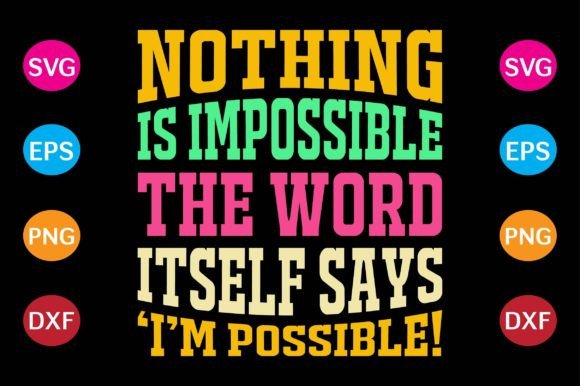
Nothing is Impossible
“Nothing is Impossible” isn’t just a phrase—it’s a functional mindset anchor. For professionals, creators, educators, and small business owners, it serves as both a design asset and a workflow catalyst. When delivered as a high-quality digital file set—SVG, PNG at 300 dpi, EPS, and DXF—it becomes more than inspiration. It becomes infrastructure: a ready-to-deploy element that integrates directly into production pipelines, creative planning, and brand-aligned execution.
How It Fits Into Real Workflows
This design doesn’t sit in isolation. It moves with intention. Before launching a back-to-school campaign, educators embed the SVG version into classroom newsletters or editable Canva templates—scaling cleanly for posters, handouts, or digital announcements. Marketing freelancers drop the EPS file into Adobe Illustrator alongside client brand guidelines, adjusting stroke weight or color mode to match print specs before sending to a local screen printer. Entrepreneurs preparing limited-run merchandise use the DXF file with their Cricut Maker or Silhouette Cameo—cutting vinyl for custom t-shirts, tote bags, or reusable water bottles in under two minutes.
The PNG at 300 dpi isn’t just “high-res”—it’s production-ready. It drops cleanly into Printful, Gelato, or local DTG workflows without upscaling artifacts. No pixelation on sleeves, no blurring on mug wraps. That consistency matters when fulfillment speed and visual fidelity impact customer trust—and repeat orders.
Preparation Makes It Plug-and-Play
What makes this file set reliable across tools isn’t just format variety—it’s intentional preparation. Each file is vector-based where appropriate (SVG, EPS, DXF), preserving scalability and editability. The PNG was exported with transparent background and embedded color profile (sRGB), ensuring accurate rendering whether viewed on an iPhone, projected in a faculty meeting, or printed on cotton-blend fabric.
That attention to detail means less time troubleshooting. No need to trace a raster image in Silhouette Studio. No last-minute Illustrator path cleanup. No guessing whether the font will render correctly on a third-party platform. You open the file, confirm dimensions (standard cut size is 10" wide × 8" tall, centered and proportionally locked), and move forward.
Compatibility Is Built In—Not Added On
- Cricut Design Space: SVG imports natively—no flattening required. Layers remain editable if grouped intentionally during export (e.g., “outline” vs. “fill” for multi-material projects).
- Silhouette Studio: DXF preserves precise line work for intricate cuts; EPS handles gradients or subtle shadows if used in layered apparel mockups.
- Adobe Creative Cloud: EPS and SVG retain vector integrity for resizing, recoloring, or combining with typography systems—ideal when building branded educator resource kits or student goal-trackers.
- Print-on-Demand Platforms: PNG 300 dpi meets minimum resolution requirements for most services, including Redbubble, Teespring, and Printify—without triggering compression warnings or auto-resizing prompts.
This cross-platform readiness reduces friction between idea and output. A homeschool co-op leader sketches a “Back to School Motivation Pack” on paper Monday morning, sources the files Tuesday, and has physical stickers and iron-on transfers in hand by Thursday afternoon—no design software license needed.
Integration Beyond the Obvious
While t-shirts are the most visible application, the real utility emerges in compound uses. A freelance curriculum designer pairs the “Nothing is Impossible” SVG with editable growth-mindset journal templates—embedding the graphic as a watermark on reflection pages, then exporting final PDFs with layered transparency intact. A small-batch candle maker uses the DXF file to laser-cut wooden wick trays, engraving the phrase subtly along the edge—not as branding, but as tactile reinforcement of their product ethos.
In team settings, the phrase functions as a lightweight alignment tool. A project manager shares the EPS file with their design and operations leads before kickoff, asking: *Where does “Nothing is Impossible” show up in our process—not just our visuals?* That question surfaces assumptions about scope, timeline, and resource access. The file becomes a conversation starter, not just decoration.
Quality Control Starts With the Files
Each format was tested against real-world failure points: • EPS opened in Illustrator CC 2023 and placed into InDesign without font substitution prompts.
That testing isn’t theoretical. It’s what keeps your production calendar predictable. When you schedule a batch of 50 custom backpacks for a youth mentorship program, you’re not debugging file compatibility—you’re verifying fabric grain direction and heat-press dwell time. The design asset stays neutral, reliable, and silent in the background.
Long-Term Use Requires Intentional Organization
Store these files with context—not just name and date. Create a folder labeled “NothingIsImpossible_BackToSchool_v2” and include a plain-text README noting: • Version history (v1 = solid fill only; v2 adds optional shadow layer)
This structure pays off when you revisit the asset six months later for a leadership workshop or end-of-year celebration. You don’t relearn the file’s behavior—you execute from documented precedent.
Efficiency Grows With Repetition—Not Just Speed
Using “Nothing is Impossible” repeatedly across projects builds muscle memory. You learn which format works fastest for your current toolchain. You notice how spacing shifts when scaling for a 12 oz ceramic mug versus a 16×20 framed print. You develop internal benchmarks: *This SVG takes 47 seconds to prep for Cricut; that’s within my 90-second per-item threshold for batch jobs.*
That kind of calibrated efficiency doesn’t come from tutorials—it comes from doing, measuring, and refining. And because the files are consistent in structure and metadata, your personal benchmarks stay transferable across devices, teams, and platforms.
Final Integration Tip: Anchor It to Outcomes, Not Just Output
Before adding “Nothing is Impossible” to your next project, ask: • How does its presence reduce ambiguity—not just add motivation?
When aligned to those questions, the design stops being decorative. It becomes operational. It supports clarity, signals commitment, and quietly reinforces agency—both for the person wearing the t-shirt and the person who chose to put it there.
That’s how “Nothing is Impossible” transitions from slogan to system. Not through volume or repetition—but through precision, preparation, and purposeful placement.