Helloween: Creative Halloween Sublimation Designs
Helloween isn’t just a playful twist on “Halloween”—it’s a fresh, brandable creative lens for seasonal design work. Think bold illustration meets functional versatility: a collection built for makers who need print-ready, editable assets that stand out *and* scale across products. Whether you’re launching a limited-edition apparel line, designing classroom decorations, or building a cohesive social media campaign for October, Helloween delivers professional-grade sublimation graphics with intentional flexibility.
What Makes Helloween Different From Standard Halloween Clipart?
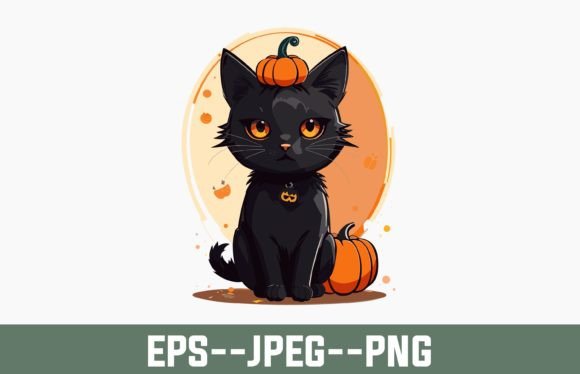
Most Halloween design packs lean into either spooky clichés or overly simplified icons. Helloween breaks that pattern by combining expressive watercolor textures with clean vector structure—so each element feels hand-crafted yet technically precise. The illustrations include stylized pumpkins, whimsical black cats, retro-inspired ghosts, and abstract fall motifs—all designed to retain clarity at any size, from 2” stickers to 24” posters.
Unlike raster-only files that blur when enlarged, every shape in this collection is built from 100% vector paths (EPS 10 compatible). That means you can stretch a jack-o’-lantern graphic across a tote bag or shrink it onto a enamel pin without losing edge integrity—or resorting to pixel-perfect manual redrawing.
Practical Applications Across Real Business Needs
This isn’t just “more clipart.” It’s infrastructure for small business execution:
- Apparel & Merch: Use the layered PNG files to mock up t-shirts, hoodies, or aprons in Canva or Adobe Express—then export directly for DTG or sublimation printing. The transparent backgrounds ensure crisp layering over fabric textures.
- Home & Lifestyle Products: Resize vector elements to fit mugs, ceramic tiles, or throw pillows. Because all colors are editable via swatches (not embedded pixels), you can match Pantone codes for branded merchandise lines without redesigning.
- Educational & Community Projects: Teachers and after-school program coordinators use the high-res JPEGs for printable classroom banners, reading corner posters, or student craft templates—no licensing concerns, no attribution required.
- Digital Content Creation: Drop SVG-compatible outlines into Figma or Illustrator to build animated social posts, email headers, or landing page visuals. The watercolor overlays add warmth without sacrificing readability.
How to Adapt Helloween for Your Audience and Goals
A freelance designer working with a local bakery might isolate the candy corn and bat motifs, recolor them in pastel pinks and creams, then apply them to cupcake wrappers and Instagram story frames. A homeschool co-op leader could extract the minimalist witch silhouette, convert it to a cut file (SVG), and laser-cut felt shapes for tactile storytelling kits. An Etsy seller launching a “spooky-but-sweet” stationery line might combine the watercolor leaf swashes with handwritten font pairings to create greeting cards that feel seasonal—not stereotypical.
The key is starting with intent: ask *who sees this*, *where will it live*, and *what action should it support*. Then use Helloween’s modularity to answer those questions—not the other way around.
Why Editability Matters More Than Ever
Many designers waste hours manually adjusting saturation, contrast, or hue shifts across dozens of files. With Helloween, color changes happen in seconds. Every element uses global swatches in Illustrator—change one swatch, and every matching object updates instantly. Need a monochrome version for embroidery? Switch to grayscale mode and adjust brightness values—not individual layers. Prepping for dark garments? Swap base colors to rich navy or charcoal before exporting your PNGs.
And because the JPEG and PNG files are separate (not flattened composites), you retain full control over blending modes, drop shadows, and layer order—even after download. No hidden raster layers. No locked transparency. Just clean, production-ready assets.
Realistic Tips for Consistent, Original Results
Consistency doesn’t mean uniformity. To keep your Helloween-based projects feeling original:
- Anchor with one signature style: Pick either the watercolor texture, retro linework, or minimalist silhouette as your dominant visual language—and let the others play supporting roles.
- Limit your palette intentionally: Use no more than four core colors per project. Pull accent tones from the included swatch library rather than adding new hues arbitrarily.
- Respect scale hierarchy: If using multiple illustrations on one product (e.g., a mug), assign clear visual weight—larger central motif, smaller repeating border, subtle background wash.
- Test before you commit: Print a 3” × 3” sample on your intended substrate first. Sublimation behaves differently on polyester vs. cotton blends; what looks vibrant on screen may mute on fabric.
Who Benefits Most From This Collection?
Helloween serves creators who value both speed and distinction. Small business owners launching seasonal collections appreciate the plug-and-play readiness—no waiting for custom illustrations. Designers building brand systems love the vector fidelity and color control. Educators and community organizers rely on the high-resolution clarity and commercial-use license. Even hobbyists crafting personalized gifts find the balance of charm and precision refreshing—no “cutesy overload,” no intimidating complexity.
It’s not about replacing your voice—it’s about removing friction between idea and output. When your tools adapt to your vision instead of forcing your vision into preset templates, creativity becomes sustainable, not exhausting.
Get Started—Without Overcomplicating It
You don’t need advanced software to begin. Open the EPS file in Affinity Designer, Inkscape, or even newer versions of Canva (with vector import enabled) to adjust colors and scale. Use the JPEG for quick mockups or presentations. Keep the PNG handy for layered digital displays or print layouts requiring transparency.
Visit the store for additional Halloween collections—including back-to-school crossover designs, Christmas-themed extensions, and retro-fall bundles—all built with the same attention to technical quality and creative utility. Each download includes instant access, no subscription, no watermarks.
If you create something with Helloween—a mural for your café, a series of teacher appreciation pins, or a viral TikTok craft tutorial—we’d love to see it. Share your project using #HelloweenDesign. And if this collection saves you time, elevates your output, or sparks a new idea: please leave a rating. It helps other creators discover tools that truly work.